/
websites
/
operateit-node
/
node_modules123123
/
prompt-checkbox
/
Upload File
HOME
# prompt-checkbox [](https://www.npmjs.com/package/prompt-checkbox) [](https://npmjs.org/package/prompt-checkbox) [](https://npmjs.org/package/prompt-checkbox) [](https://travis-ci.org/enquirer/prompt-checkbox) > Multiple-choice/checkbox prompt. Can be used standalone or with a prompt system like [Enquirer](http://enquirer.io). 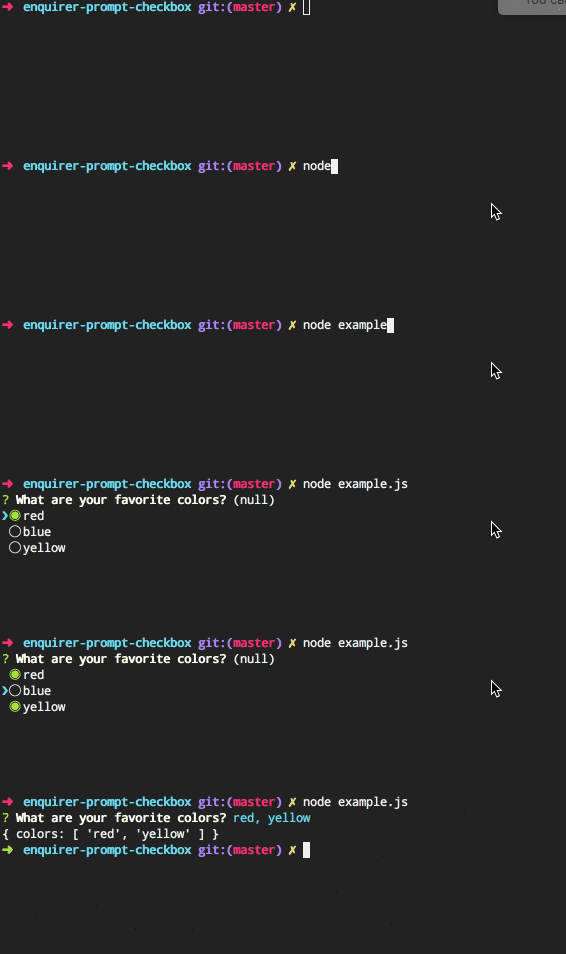 ## Install Install with [npm](https://www.npmjs.com/): ```sh $ npm install --save prompt-checkbox ``` ## Usage ```js var Prompt = require('prompt-checkbox'); var prompt = new Prompt({ name: 'colors', message: 'What are your favorite colors?', choices: [ 'red', 'blue', 'yellow' ] }); // promises prompt.run() .then(function(answers) { console.log(answers) }) .catch(function(err) { console.log(err) }) // async prompt.ask(function(answers) { console.log(answers) }); ``` ## Special features Features you won't find with other prompts! ### Choices function Define choices as a function. This allows you to dynamically generate the choices when the question is asked. ```js var prompt = new Prompt({ name: 'colors', message: 'What are your favorite colors?', choices: function() { // dynamically build choices return ['red', 'blue', 'green']; } }); ``` ### Choice groups 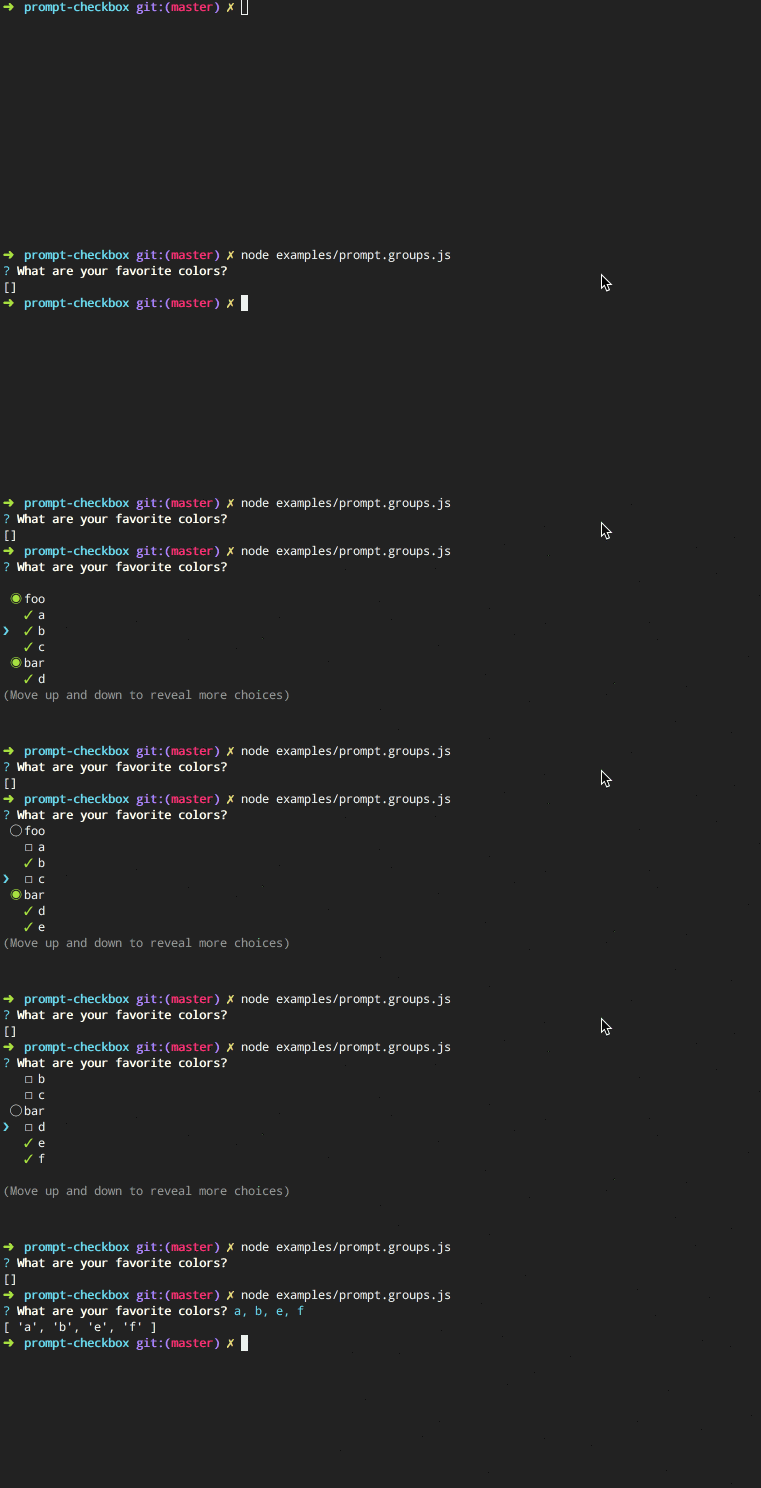 **Easy to configure!** Just pass an object of arrays on `choices`, and each key in the object will be used as the group "toggle": ```js var Prompt = require('prompt-checkbox'); var prompt = new Prompt({ name: 'install', message: 'Which packages do you want to install?', choices: { dependencies: ['generate', 'micromatch'], devDependencies: ['mocha', 'kind-of'] } }); ``` ### Radio choices Adds `all` and `none` choices, which select or deselect all choices, respectively. Named "radio choices" since it acts like a hybrid between checkboxes and radio buttons. <br> 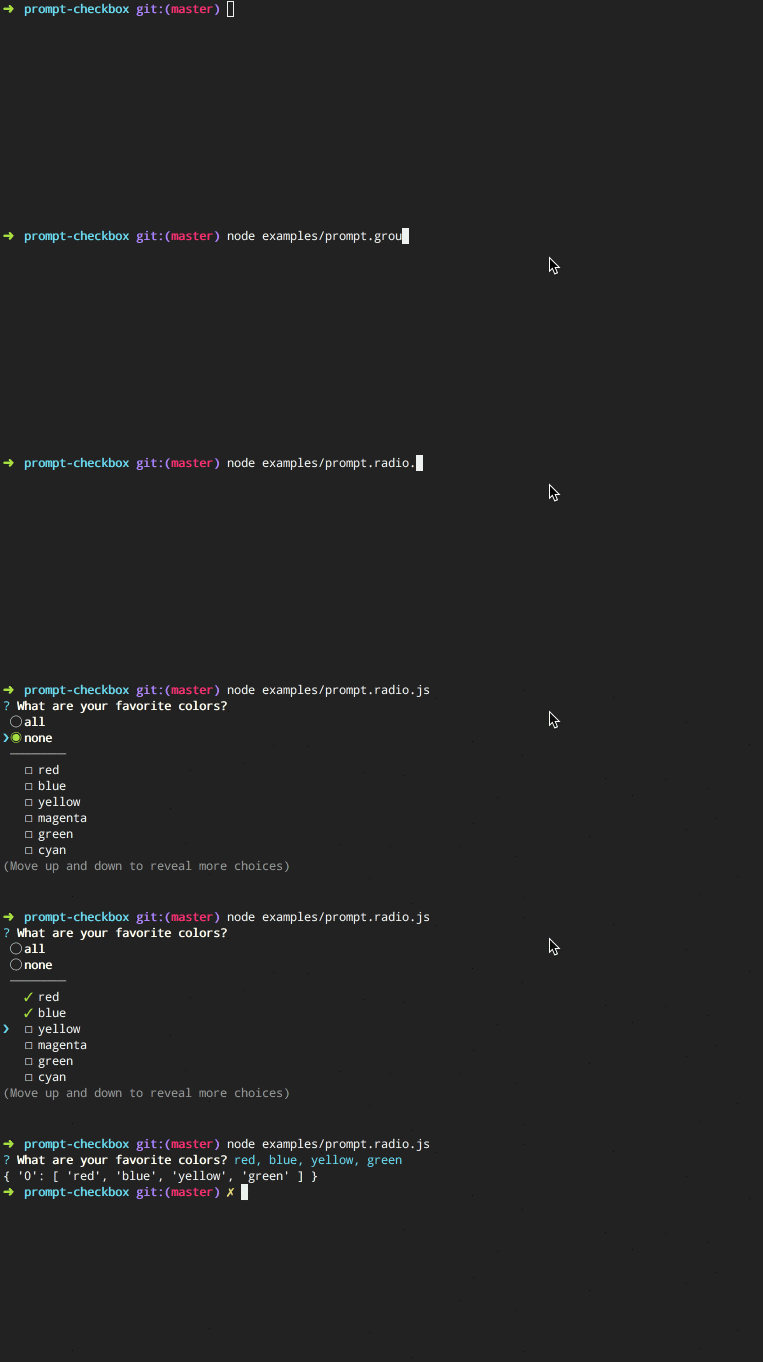 **Code example** ```js var Prompt = require('prompt-checkbox'); var prompt = new Prompt({ name: 'install', message: 'Which packages do you want to install?', radio: true, choices: ['foo', 'bar', 'baz'] }); ``` ### Radio groups Use "radio" choices with choice groups. <br> 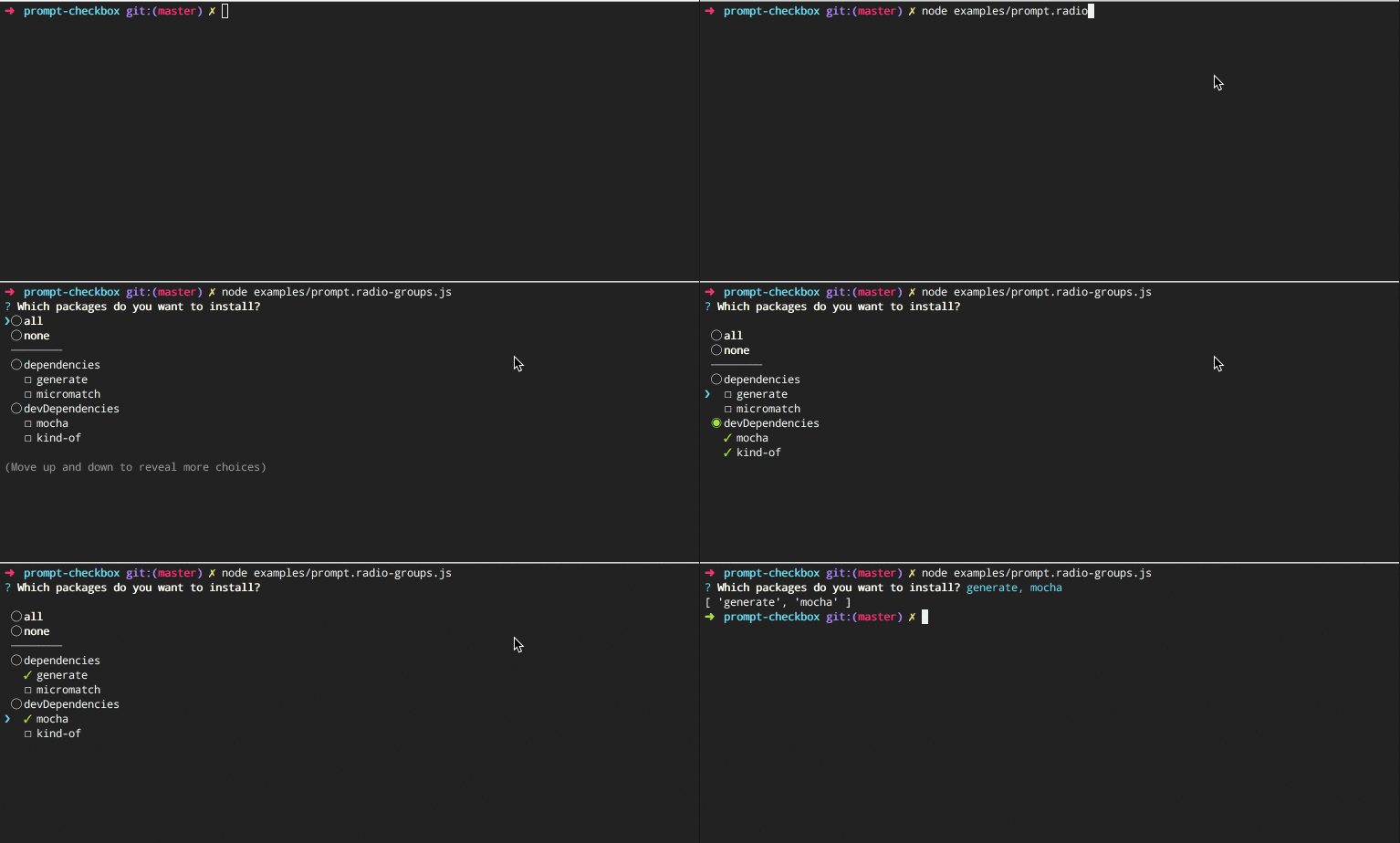 ```js var Prompt = require('prompt-checkbox'); var prompt = new Prompt({ name: 'install', message: 'Which packages do you want to install?', radio: true, choices: { dependencies: ['generate', 'micromatch'], devDependencies: ['mocha', 'kind-of'] } }); ``` ## options The following options are either specific to prompt-checkbox, or have behavior that differs in some way from the built-in options from [prompt-base](https://github.com/enquirer/prompt-base). _(Any other options from [prompt-base](https://github.com/enquirer/prompt-base) may be used as well.)_ ### options.default **Type**: `string|number|array` **Default**: `undefined` Specify the "default" choices to check when the prompt is initialized. Default can be a choice name (string), index (number), or an array of choice names or indices. **Examples** Specify default as a string (choice name): ```js var prompt = new Prompt({ name: 'colors', message: 'Best flavor?', default: 'chocolate', choices: ['chocolate'] // <= hmm, I wonder what they'll choose? }); ``` Specify an array of defaults (choice names or indices): ```js var prompt = new Prompt({ name: 'colors', message: 'Favorite colors?', default: [1, 'blue'], choices: ['red', 'blue', 'yellow'] }); ``` ### options.radio **Type**: `boolean` **Default**: `undefined` Enable hybrid radio-checkbox support, which adds `all` and `none` radio options for toggling all options on and off. ```js var Prompt = require('prompt-checkbox'); var prompt = new Prompt({ name: 'colors', message: 'What are your favorite colors?', radio: true, choices: [ 'red', 'blue', 'yellow' ] }); ``` ### options.transform **Type**: `function` **Default**: `undefined` Modify answer values before they're returned. **Example** Use `options.transform` and the `prompt.choices.get()` method to convert answers (checked choices) to an array of objects (versus of an array of strings). ```js var Prompt = require('prompt-checkbox'); var prompt = new Prompt({ name: 'colors', message: 'What are your favorite colors?', choices: ['red', 'blue', 'yellow'], transform: function(answer) { // - "this" is the prompt instance // - "this.choices.get()" returns the choice object for each choice return answer ? answer.map(this.choices.get.bind(this.choices)) : []; } }); ``` ## Keypresses In addition to the keypresses that are supported by [prompt-base](https://github.com/enquirer/prompt-base), the following keypress offer different behavior that is specific to checklists: * <kbd>down</kbd> - move the pointer (cursor) down one row for each keypress * <kbd>up</kbd> - move the pointer (cursor) up one row for each keypress * <kbd>i</kbd> - toggle all choices to the opposite of their current state. * <kbd>a</kbd> - enable or disable all choices * <kbd>space</kbd> - toggle a choice * <kbd>number</kbd> - toggle the choice at the given index (starting at 1) ## Usage with [enquirer](http://enquirer.io) Register the prompt with enquirer: ```js var Enquirer = require('enquirer'); var enquirer = new Enquirer(); enquirer.register('checkbox', require('prompt-checkbox')); ``` ### Enquirer examples For formatting questions, [enquirer](http://enquirer.io) supports either: * declarative, inquirer-style question format * functional format using the `.question` method. **Inquirer-style questions** Declarative questions format, similar to `inquirer`. ```js var questions = [ { name: 'color', message: 'What is your favorite color?', type: 'checkbox', default: 'blue', choices: ['red', 'yellow', 'blue'] } ]; enquirer.prompt(questions) .then(function(answers) { console.log(answers) }); ``` Or: ```js enquirer.prompt({ name: 'color', message: 'What is your favorite color?', type: 'checkbox', default: 'blue', choices: ['red', 'yellow', 'blue'] }) .then(function(answers) { console.log(answers) }); ``` **Functional-style questions** Use the `.question` method to pre-register questions, so they can be called later. Also, the `message` may be passed as the second argument, or as a property on the question options. ```js enquirer.question('letter', 'What are your favorite letters?', { type: 'checkbox', //<= specify the prompt type choices: ['a', 'b', 'c'] }); enquirer.question('numbers', { type: 'checkbox', //<= specify the prompt type message: 'What are your favorite numbers?', choices: ['1', '2', '3'] }); // pass the name(s) or questions to ask enquirer.prompt(['letters', 'numbers']) .then(function(answers) { console.log(answers) }); ``` ## About ### Related projects * [enquirer](https://www.npmjs.com/package/enquirer): Intuitive, plugin-based prompt system for node.js. | [homepage](http://enquirer.io "Intuitive, plugin-based prompt system for node.js.") * [prompt-base](https://www.npmjs.com/package/prompt-base): Base prompt module used for creating custom prompts. | [homepage](https://github.com/enquirer/prompt-base "Base prompt module used for creating custom prompts.") * [prompt-choices](https://www.npmjs.com/package/prompt-choices): Create an array of multiple choice objects for use in prompts. | [homepage](https://github.com/enquirer/prompt-choices "Create an array of multiple choice objects for use in prompts.") * [prompt-question](https://www.npmjs.com/package/prompt-question): Question object, used by Enquirer and prompt plugins. | [homepage](https://github.com/enquirer/prompt-question "Question object, used by Enquirer and prompt plugins.") ### Contributing Pull requests and stars are always welcome. For bugs and feature requests, [please create an issue](../../issues/new). ### Running tests Running and reviewing unit tests is a great way to get familiarized with a library and its API. You can install dependencies and run tests with the following command: ```sh $ npm install && npm test ``` ### Author **Jon Schlinkert** * [github/jonschlinkert](https://github.com/jonschlinkert) * [twitter/jonschlinkert](https://twitter.com/jonschlinkert) ### License Copyright © 2017, [Jon Schlinkert](https://github.com/jonschlinkert). Released under the [MIT License](LICENSE). *** _This file was generated by [verb-generate-readme](https://github.com/verbose/verb-generate-readme), v0.6.0, on July 08, 2017._